¶ BROODBUNDLE LAUNCHER
Simple Minecraft launcher based upon SKCraft Launcher designed to automatically install & update BroodBundle modpacks & mods. From now on this will be the ONLY way to install our modpacks to join our servers. Other methods will no longer be supported by me.
Download for Windows (Automatic Installer)
Download for Linux / SteamOS (AppImage)
Important info for Windows: For as long as I don't have a verification; the file will be marked unsafe, click on "More Info" and then "Run Anyway" to bypass this.
Important info for Steam Deck: Right clicking on the file and pressing "Add to Steam" will allow you to play in SteamOS Gaming Mode!
¶ Installation
- Install BroodBundle Launcher (Download found at the top of the page)
- Select the modpack of choice (Currently Burrito Pack 2026)
- Press play, login using your Microsoft account (Mojang logins no longer exist)
- If it's asked to update Xaero's World Map upon launching, press "Do not ask again".
- A pop-up will appear with optional features you can enable or disable. Everything that is enabled by default is recommended, including resource packs. But if you wish to disable some of the features, you will be perfectly able to. Read below to see what these optional features are.
- Enjoy!
¶ Optional Features
These features are completely optional but recommended to have on by default. These include resource packs, audio tweaks & other visual additions. This section will help you explain what each feature does. Some of these features are personal opinion.
- Advancement Plaques: Makes a sound and a visual pop-up everytime you get an advancement/achievement;
- Alternate Current: Performance mod that makes redstone a lot more performant;
- Ambient Sounds: Adds a whole arrange of sounds that makes the world feel more lively, including wind that you hear when you're high up or dark ambient noises within caves or the nether;
- Apple Skin: Adds a overlay over your hungerbar that makes saturation a visible mechanic;
- Catalogue: A better mod-menu;
- Continuity: Adds connected textures for glass and other vanilla blocks;
- Curated Resource - Authentic Shadows: Makes entity shadows properly pixelated;
- Curated Resource - Better Carpets: Makes carpets and moss have an overhang;
- Curated Resource - Compact Font: Replaces Minecraft's font with something a little more charming;
- Curated Resource - Corality: Improves coral visuals and adds more variety in it's textures;
- Curated Resource - Detail Brush: Improves some of Minecraft's textures to more fit in the artstyle they're slowly progressing to;
- Curated Resource - Ender Eyes: Gives Ender Eyes an animated texture to make them blink, making them feel more alien-like;
- Curated Resource - Simple Grass Flowers: Adds random flowers throughout grass blocks to make the world feel more lively;
- Curated Resource - Spring Flowers: Adds variety to flower textures;
- Curated Resource - Waystones Redesign: Gives waystones an improved model to more fit with the rest of the pack;
- Curated Resource - Xaero's Vanilla UI: Gives the in-game map a more vanilla-like aesthetic;
- Distant Horizons: Allows you to see much farther render distances with very little performance impact through the use-case of LODs;
- Enchantment Descriptions: This will give you descriptions as to what each and every enchantment does;
- Explosive Enhancement: This revamps Minecraft's explosion visuals;
- Held Item Tooltips: When selecting an item in your hotbar you will see a visual indicator as to what this item is with some data such as enchantments;
- Hold My Items: This completely revamps Minecraft's first-person animations;
- Jade: A very useful mod that adds a visual indicator of what block you are looking at, from which mod the block is and some useful information of said block;
- Neko's Enchanted Books: Makes it so every enchanted book will have a unique texture;
- Noisium: Improves world generation by optimizing Minecraft's noise algorithms;
- Particle Rain: Completely revamps weather visuals and adds other visual ambience during;
- Particular: Adds ambient particles, water splashes and more to liven up the world;
- Pick-Up Notifier: Adds a visual indicator when you pick up an item;
- Raised: Moves the hotbar up, similar to bedrock edition;
- Sound Physics: Adds reverb and sound occlusion to create more immersive 3D sound;
- Subtle Effects: Adds even more ambient effects such as sparks with using an anvil or where there is a fire;
- Tiny Item Animations: Gives a few animations to your inventory screen when dragging items;
- Tooltip Overhaul: Completely overhauls Minecraft's tooltips to add more flair to an item;
- Villager Names: Turning this off does nothing except for singleplayer as it adds names to villagers and goblin traders;
- Voice Chat: Adds a proximity voice chat to Minecraft, turning this off also means you can't hear others in-game;
- Wakes: Adds trails to boats and other objects moving around in water;
- Xaero's World Map: Adds an in-game worldmap, very useful for exploration.
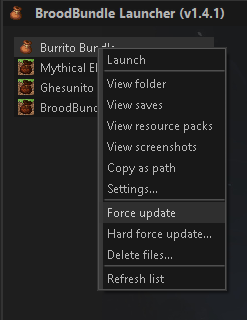
If in any case you wish to change these settings at any time, you want to right click on the instance (currently Burrito Pack) and press “Force Update".